In order.
Always.
School life is ten group chats, three inboxes and a bag full of paper. Forward it, snap it or paste it into Beka, and only what matters comes out the other side.


Google Play and the Google Play logo are trademarks of Google LLC. Apple and the App Store are trademarks of Apple Inc.
See where Beka's available — we're adding regions as we grow.
Beka is on the App Store and Google Play in Australia and South Africa right now, and we’re opening up new regions as we grow. If it’s not live where you are yet, it’s coming.
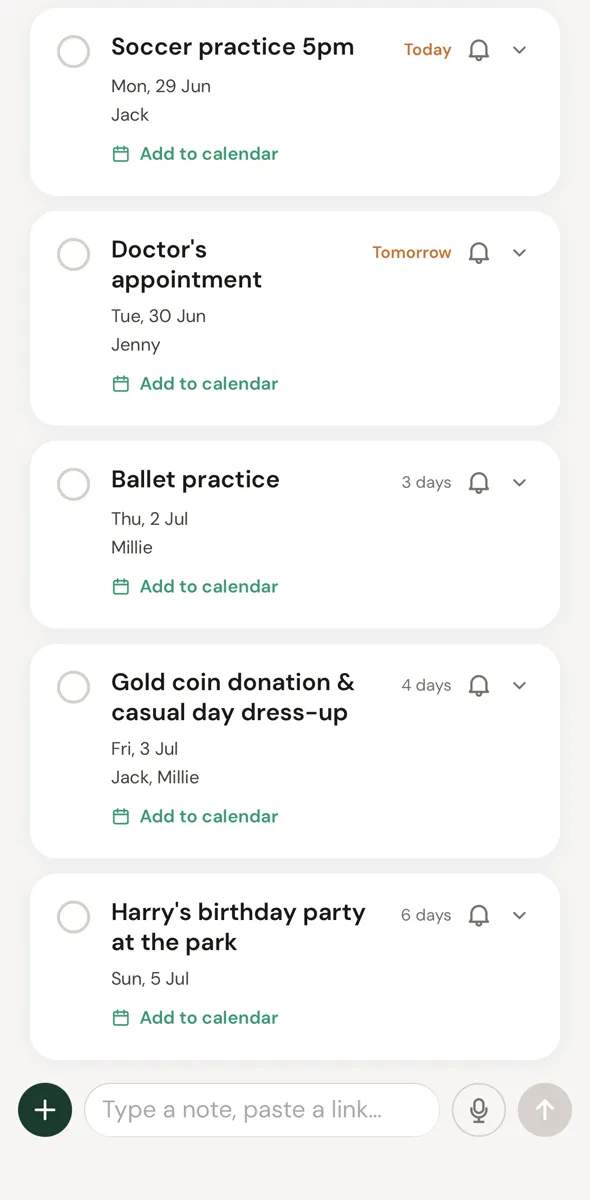
4 things this week
- Mon: Soccer practice 5pm
- Tue: Doctor's appointment
- Thu: Ballet practice
- Fri: Free-dress day — small donation
Send the mess in. Get the signal back.
Beka reads whatever you throw at it and pulls out the dates, deadlines, costs and who needs to reply. The whole family sees the same calm feed.
Forward it
Your family gets its own Beka inbox. Auto-forward the senders you trust.
Snap it
Paper slips, flyers and the noticeboard at pickup.
Screenshot it
The class chat, the team WhatsApp, a text from coach.
Upload it
Newsletters, PDFs and pasted links.
Or just say it
Walking out of pickup? Hold the mic: “Jack needs coins for Friday and Millie's ballet moved to four.” Beka files both.
Any list, one voice note away.
To buy for school, packing for camp, the weekly shop. Beka starts lists from the notes you send and adds to them when you speak. Costume bits from the newsletter land on the list before you've left the car park.
To buy for school
Lands where you already look
One tap adds any event to Apple, Google or Outlook. Beka is the sorter, not another place to live.
Free while we're in early access.
Beka is free for every family who joins now. We'll give you plenty of notice before that changes.
What devices does Beka work on?
Beka is on iPhone and Android — download it from the App Store or Google Play.
Is Beka on Android?
Yes — Beka is live on Google Play. iPhone and Android parents share the same family, so mixed households work fine.
Can I get Beka where I live?
Beka is on the App Store and Google Play in Australia and South Africa right now, and we’re opening up new regions as we grow. If it’s not live where you are yet, it’s coming.
Is this just another app to live in?
No, that's the point. Events flow into the calendar you already use, and Beka's own feed is there when you want a quick look, never required.
Is my information safe?
Yes. Your information is encrypted, visible only to the people you invite, and we never sell your data; the full detail is in our Terms and privacy.
What can I send to Beka?
Pretty much anything you'd otherwise have to read and remember:
- Forwarded emails (newsletters, school updates, club announcements)
- Screenshots of group chats and texts
- PDFs and class app exports
- Photos of noticeboards, flyers, or paper slips
- Pasted links to web pages
You can also set up auto-forwarding so emails from a particular sender flow into Beka without you lifting a finger.
Does the whole family see the same view?
Yes. Whoever sends something in, it lands in one shared family feed, visible to every adult you've invited. No forwarding back and forth between parents, and everyone works from the same view.
How does it know who something belongs to?
You set up your kids once with names, year levels, activities. After that, Beka uses the context inside each message to figure out who it's for. A note about Year 5 maths homework lands with the Year 5 child. A soccer team text lands with the kid who plays soccer.
If something can't be confidently routed, it goes to “everyone” so nothing slips through. You can correct any item with a single tap, and Beka quietly learns from your corrections.
Is Beka free?
Yes. Beka is free while we're in early access — no card, no trial countdown.
Will it always be free?
We'll bring in paid plans as Beka grows. Families using it now will hear from us well before anything changes, and nothing will start charging without you choosing it.
What happens to my family's stuff if I don't take a paid plan later?
Your family's information stays yours. We'll be clear about what stays free before we ask anyone for anything.
Can I get in touch?
Please do. Beka is built around real parent feedback; if something's broken, missing, or could be better, we want to hear about it. Send us a note.